
要将您的原生库项目作为 Gradle 构建依赖项包含在内,您需要向 Gradle 提供 CMake 或 ndk-build 脚本文件的路径。构建应用时,Gradle 会运行 CMake 或 ndk-build,并将共享库与您的应用一起打包。Gradle 还会使用构建脚本来识别要拉取到 Android Studio 项目中的文件,以便您可以从Project窗口访问它们。如果您没有用于原生源的构建脚本,则需要先创建 CMake 构建脚本,然后再继续。
Android 项目中的每个模块只能链接到一个 CMake 或 ndk-build 脚本文件。因此,例如,如果您想从多个 CMake 项目构建和打包输出,您需要使用一个 CMakeLists.txt 文件作为您的顶级 CMake 构建脚本(然后您将其关联到 Gradle),并将其他 CMake 项目添加为该构建脚本的依赖项。同样,如果您使用 ndk-build,可以在顶级 Android.mk 脚本文件中包含其他 Makefile。
将 Gradle 关联到原生项目后,Android Studio 会更新 Project 窗格,在 cpp 组中显示您的源文件和原生库,并在 External Build Files 组中显示您的外部构建脚本。
注意:修改 Gradle 配置后,请务必点击工具栏中的Sync Project  来应用更改。此外,在将 CMake 或 ndk-build 脚本文件关联到 Gradle 后对其进行更改时,您应通过从菜单栏中选择 Build > Refresh Linked C++ Projects 来将 Android Studio 与您的更改同步。
使用 Android Studio UI
您可以使用 Android Studio UI 将 Gradle 关联到外部 CMake 或 ndk-build 项目
- 从 IDE 左侧打开 Project 窗格,然后选择 Android 视图。
- 右键点击您想关联到原生库的模块,例如 app 模块,然后从菜单中选择 Link C++ Project with Gradle。您应该会看到一个类似于图 4 所示的对话框。
- 从下拉菜单中,选择 CMake 或 ndk-build。
- 如果您选择 CMake,请使用 Project Path 旁边的字段指定外部 CMake 项目的
CMakeLists.txt脚本文件。 - 如果您选择 ndk-build,请使用 Project Path 旁边的字段指定外部 ndk-build 项目的
Android.mk脚本文件。如果Application.mk文件与您的Android.mk文件位于同一目录中,Android Studio 也会包含该Application.mk文件。
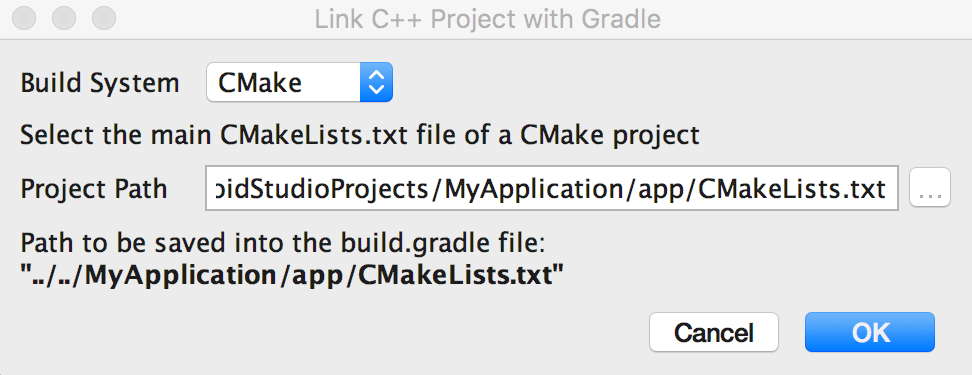
图 4. 使用 Android Studio 对话框关联外部 C++ 项目。
- 如果您选择 CMake,请使用 Project Path 旁边的字段指定外部 CMake 项目的
- 点击 OK。
手动配置 Gradle
要手动配置 Gradle 以关联您的原生库,您需要在模块级 build.gradle 文件中添加 externalNativeBuild 代码块,并使用 cmake 或 ndkBuild 代码块对其进行配置
Groovy
android {
  ...
  defaultConfig {...}
  buildTypes {...}

  // Encapsulates your external native build configurations.
  externalNativeBuild {

    // Encapsulates your CMake build configurations.
    cmake {

      // Provides a relative path to your CMake build script.
      path "CMakeLists.txt"
    }
  }
}
Kotlin
android {
  ...
  defaultConfig {...}
  buildTypes {...}

  // Encapsulates your external native build configurations.
  externalNativeBuild {

    // Encapsulates your CMake build configurations.
    cmake {

      // Provides a relative path to your CMake build script.
      path = file("CMakeLists.txt")
    }
  }
}
注意:如果您想将 Gradle 关联到现有 ndk-build 项目,请使用 ndkBuild 代码块而不是 cmake 代码块,并提供 Android.mk 文件的相对路径。如果 Application.mk 文件与您的 Android.mk 文件位于同一目录中,Gradle 也会包含该文件。
指定可选配置
您可以通过在模块级 build.gradle 文件的 defaultConfig 代码块中配置另一个 externalNativeBuild 代码块来为 CMake 或 ndk-build 指定可选参数和标志。与 defaultConfig 代码块中的其他属性类似,您可以为构建配置中的每个产品变种(product flavor)覆盖这些属性。
例如,如果您的 CMake 或 ndk-build 项目定义了多个原生库和可执行文件,您可以使用 targets 属性来仅为给定产品变种构建和打包这些工件的子集。以下代码示例描述了您可以配置的一些属性
Groovy
android {
  ...
  defaultConfig {
    ...
    // This block is different from the one you use to link Gradle
    // to your CMake or ndk-build script.
    externalNativeBuild {

      // For ndk-build, instead use the ndkBuild block.
      cmake {

        // Passes optional arguments to CMake.
        arguments "-DANDROID_ARM_NEON=TRUE", "-DANDROID_TOOLCHAIN=clang"

        // Sets a flag to enable format macro constants for the C compiler.
        cFlags "-D__STDC_FORMAT_MACROS"

        // Sets optional flags for the C++ compiler.
        cppFlags "-fexceptions", "-frtti"
      }
    }
  }

  buildTypes {...}

  productFlavors {
    ...
    demo {
      ...
      externalNativeBuild {
        cmake {
          ...
          // Specifies which native libraries or executables to build and package
          // for this product flavor. The following tells Gradle to build only the
          // "native-lib-demo" and "my-executible-demo" outputs from the linked
          // CMake project. If you don't configure this property, Gradle builds all
          // executables and shared object libraries that you define in your CMake
          // (or ndk-build) project. However, by default, Gradle packages only the
          // shared libraries in your app.
          targets "native-lib-demo",
                  // You need to specify this executable and its sources in your CMakeLists.txt
                  // using the add_executable() command. However, building executables from your
                  // native sources is optional, and building native libraries to package into
                  // your app satisfies most project requirements.
                  "my-executible-demo"
        }
      }
    }

    paid {
      ...
      externalNativeBuild {
        cmake {
          ...
          targets "native-lib-paid",
                  "my-executible-paid"
        }
      }
    }
  }

  // Use this block to link Gradle to your CMake or ndk-build script.
  externalNativeBuild {
    cmake {...}
    // or ndkBuild {...}
  }
}
Kotlin
android {
  ...
  defaultConfig {
    ...
    // This block is different from the one you use to link Gradle
    // to your CMake or ndk-build script.
    externalNativeBuild {

      // For ndk-build, instead use the ndkBuild block.
      cmake {

        // Passes optional arguments to CMake.
        arguments += listOf("-DANDROID_ARM_NEON=TRUE", "-DANDROID_TOOLCHAIN=clang")

        // Sets a flag to enable format macro constants for the C compiler.
        cFlags += listOf("-D__STDC_FORMAT_MACROS")

        // Sets optional flags for the C++ compiler.
        cppFlags += listOf("-fexceptions", "-frtti")
      }
    }
  }

  buildTypes {...}

  productFlavors {
    ...
    create("demo") {
      ...
      externalNativeBuild {
        cmake {
          ...
          // Specifies which native libraries or executables to build and package
          // for this product flavor. The following tells Gradle to build only the
          // "native-lib-demo" and "my-executible-demo" outputs from the linked
          // CMake project. If you don't configure this property, Gradle builds all
          // executables and shared object libraries that you define in your CMake
          // (or ndk-build) project. However, by default, Gradle packages only the
          // shared libraries in your app.
          targets += listOf("native-lib-demo",
                  // You need to specify this executable and its sources in your CMakeLists.txt
                  // using the add_executable() command. However, building executables from your
                  // native sources is optional, and building native libraries to package into
                  // your app satisfies most project requirements.
                  "my-executible-demo")
        }
      }
    }

    create("paid") {
      ...
      externalNativeBuild {
        cmake {
          ...
          targets += listOf("native-lib-paid",
                  "my-executible-paid")
        }
      }
    }
  }

  // Use this block to link Gradle to your CMake or ndk-build script.
  externalNativeBuild {
    cmake {...}
    // or ndkBuild {...}
  }
}
要详细了解如何配置产品变种和构建变体,请访问配置构建变体。有关可使用 arguments 属性为 CMake 配置的变量列表,请参阅使用 CMake 变量。
包含预构建原生库
如果您希望 Gradle 打包任何外部原生构建中未使用的预构建原生库,请将它们添加到模块的 src/main/jniLibs/ABI 目录中。
Android Gradle 插件 4.0 之前的版本要求在 jniLibs 目录中包含 CMake IMPORTED 目标,才能将其包含在应用中。如果您正在从较早版本的插件迁移,可能会遇到以下错误
* What went wrong:
Execution failed for task ':app:mergeDebugNativeLibs'.
> A failure occurred while executing com.android.build.gradle.internal.tasks.Workers$ActionFacade
   > More than one file was found with OS independent path 'lib/x86/libprebuilt.so'
如果您使用的是 Android Gradle 插件 4.0,请将 IMPORTED CMake 目标使用的所有库移出 jniLibs 目录,以避免此错误。
指定 ABI
默认情况下,Gradle 会将您的原生库构建为单独的 .so 文件,以支持 NDK 支持的应用二进制接口 (ABI),并将它们全部打包到您的应用中。如果您希望 Gradle 仅构建和打包原生库的某些 ABI 配置,可以使用模块级 build.gradle 文件中的 ndk.abiFilters 标志来指定它们,如下所示
Groovy
android {
  ...
  defaultConfig {
    ...
    externalNativeBuild {
      cmake {...}
      // or ndkBuild {...}
    }

    // Similar to other properties in the defaultConfig block,
    // you can configure the ndk block for each product flavor
    // in your build configuration.
    ndk {
      // Specifies the ABI configurations of your native
      // libraries Gradle should build and package with your app.
      abiFilters 'x86', 'x86_64', 'armeabi', 'armeabi-v7a',
                   'arm64-v8a'
    }
  }
  buildTypes {...}
  externalNativeBuild {...}
}
Kotlin
android {
  ...
  defaultConfig {
    ...
    externalNativeBuild {
      cmake {...}
      // or ndkBuild {...}
    }

    // Similar to other properties in the defaultConfig block,
    // you can configure the ndk block for each product flavor
    // in your build configuration.
    ndk {
      // Specifies the ABI configurations of your native
      // libraries Gradle should build and package with your app.
      abiFilters += listOf("x86", "x86_64", "armeabi", "armeabi-v7a",
                   "arm64-v8a")
    }
  }
  buildTypes {...}
  externalNativeBuild {...}
}
在大多数情况下,您只需像上面所示在 ndk 代码块中指定 abiFilters,因为它会告诉 Gradle 构建并打包这些版本的原生库。但是,如果您想独立于要打包到应用中的内容来控制 Gradle 应构建的内容,请在 defaultConfig.externalNativeBuild.cmake 代码块(或 defaultConfig.externalNativeBuild.ndkBuild 代码块)中配置另一个 abiFilters 标志。Gradle 会构建这些 ABI 配置,但只会打包您在 defaultConfig.ndk 代码块中指定的那些。
建议使用 Android App Bundles 发布应用,以进一步减小应用大小,因为只有与用户设备 ABI 匹配的原生库才会随下载一起提供。
对于使用 APK 发布的应用(在 2021 年 8 月之前创建的旧版应用),请考虑根据 ABI 配置多个 APK——Gradle 不会创建包含所有版本原生库的单个大型 APK,而是为每个您希望支持的 ABI 创建一个单独的 APK,并仅打包每个 ABI 所需的文件。如果您为每个 ABI 配置多个 APK,但未如上述代码示例所示指定 abiFilters 标志,则 Gradle 会构建所有受支持的 ABI 版本原生库,但只会打包您在多个 APK 配置中指定的那些。为避免构建您不想要的原生库版本,请为 abiFilters 标志和您的每个 ABI 多个 APK 配置提供相同的 ABI 列表。