
Espresso 提供了一些机制,可用于滚动到或处理两种类型的列表中的特定项:适配器视图和 RecyclerView。
在处理列表(尤其是使用 RecyclerView 或 AdapterView 对象创建的列表)时,您感兴趣的视图可能甚至不在屏幕上,因为只有少数子项会显示,并在您滚动时循环利用。scrollTo() 方法在这种情况下无法使用,因为它需要现有视图。
与适配器视图列表项互动
您可以不使用 onView() 方法,而是使用 onData() 开始搜索,并针对您要匹配的视图所依据的数据提供匹配器。Espresso 将完成在 Adapter 对象中查找行并将项显示在视口中的所有工作。
使用自定义视图匹配器匹配数据
下面的 Activity 包含一个 ListView,它由一个 SimpleAdapter 提供支持,后者将每行的数据保存在一个 Map<String, Object> 对象中。
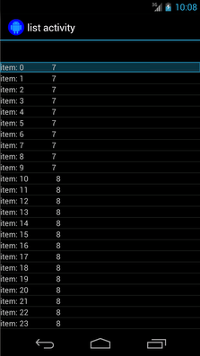
每个映射都有两个条目:一个包含字符串(例如 "item: x")的键 "STR",以及一个包含 Integer(表示内容长度)的键 "LEN"。例如
{"STR" : "item: 0", "LEN": 7}
点击“item: 50”所在行的代码如下:
Kotlin
onData(allOf(`is`(instanceOf(Map::class.java)), hasEntry(equalTo("STR"),
        `is`("item: 50")))).perform(click())
Java
onData(allOf(is(instanceOf(Map.class)), hasEntry(equalTo("STR"), is("item: 50"))))
    .perform(click());
请注意,Espresso 会根据需要自动滚动列表。
让我们分析一下 onData() 中的 Matcher<Object>。is(instanceOf(Map.class)) 方法将搜索范围缩小到由 Map 对象支持的 AdapterView 的任何项。
在本例中,此查询方面匹配列表视图的每一行,但我们希望点击特定项,因此我们使用以下代码进一步缩小搜索范围:
Kotlin
hasEntry(equalTo("STR"), `is`("item: 50"))
Java
hasEntry(equalTo("STR"), is("item: 50"))
此 Matcher<String, Object> 将匹配包含键 "STR" 和值 "item: 50" 的条目的任何 Map。由于查找此项的代码很长,并且我们希望在其他位置重复使用它,因此我们为此编写一个自定义 withItemContent 匹配器
Kotlin
return object : BoundedMatcher<Object, Map>(Map::class.java) {
    override fun matchesSafely(map: Map): Boolean {
        return hasEntry(equalTo("STR"), itemTextMatcher).matches(map)
    }

    override fun describeTo(description: Description) {
        description.appendText("with item content: ")
        itemTextMatcher.describeTo(description)
    }
}
Java
return new BoundedMatcher<Object, Map>(Map.class) {
    @Override
    public boolean matchesSafely(Map map) {
        return hasEntry(equalTo("STR"), itemTextMatcher).matches(map);
    }

    @Override
    public void describeTo(Description description) {
        description.appendText("with item content: ");
        itemTextMatcher.describeTo(description);
    }
};
您将 BoundedMatcher 用作基类,因为它仅匹配 Map 类型的对象。替换 matchesSafely() 方法,将前面找到的匹配器放入其中,并将其与您可以作为参数传递的 Matcher<String> 进行匹配。这样您就可以调用 withItemContent(equalTo("foo"))。为了代码简洁,您可以创建另一个已经调用 equalTo() 并接受 String 对象的匹配器
Kotlin
fun withItemContent(expectedText: String): Matcher<Object> {
    checkNotNull(expectedText)
    return withItemContent(equalTo(expectedText))
}
Java
public static Matcher<Object> withItemContent(String expectedText) {
    checkNotNull(expectedText);
    return withItemContent(equalTo(expectedText));
}
现在点击该项的代码很简单:
Kotlin
onData(withItemContent("item: 50")).perform(click())
Java
onData(withItemContent("item: 50")).perform(click());
如需此测试的完整代码,请查看 GitHub 上 AdapterViewTest 类中的 testClickOnItem50() 方法以及此自定义 LongListMatchers 匹配器。
匹配特定子视图
上面的示例在 ListView 的整个行的中间发出点击。但如果我们想操作行的特定子项,该怎么办?例如,我们想点击 LongListActivity 行的第二列,该列显示第一列内容的 String.length
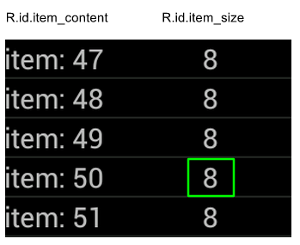
只需将 onChildView() 规范添加到 DataInteraction 的实现中即可。
Kotlin
onData(withItemContent("item: 60"))
    .onChildView(withId(R.id.item_size))
    .perform(click())
Java
onData(withItemContent("item: 60"))
    .onChildView(withId(R.id.item_size))
    .perform(click());
与 RecyclerView 列表项互动
RecyclerView 对象的运作方式不同于 AdapterView 对象,因此无法使用 onData() 与它们互动。
要使用 Espresso 与 RecyclerView 互动,您可以使用 espresso-contrib 软件包,其中包含一系列 RecyclerViewActions,可用于滚动到某个位置或对项执行操作
scrollTo()- 如果存在匹配的视图,则滚动到该视图。scrollToHolder()- 如果存在匹配的视图持有者,则滚动到该视图持有者。scrollToPosition()- 滚动到特定位置。actionOnHolderItem()- 对匹配的视图持有者执行视图操作。actionOnItem()- 对匹配的视图执行视图操作。actionOnItemAtPosition()- 对特定位置的视图执行 ViewAction。
以下代码段是 RecyclerViewSample 示例中的一些例子:
Kotlin
@Test(expected = PerformException::class)
fun itemWithText_doesNotExist() {
    // Attempt to scroll to an item that contains the special text.
    onView(ViewMatchers.withId(R.id.recyclerView))
        .perform(
            // scrollTo will fail the test if no item matches.
            RecyclerViewActions.scrollTo(
                hasDescendant(withText("not in the list"))
            )
        )
}
Java
@Test(expected = PerformException.class)
public void itemWithText_doesNotExist() {
    // Attempt to scroll to an item that contains the special text.
    onView(ViewMatchers.withId(R.id.recyclerView))
            // scrollTo will fail the test if no item matches.
            .perform(RecyclerViewActions.scrollTo(
                    hasDescendant(withText("not in the list"))
            ));
}
Kotlin
@Test fun scrollToItemBelowFold_checkItsText() {
    // First, scroll to the position that needs to be matched and click on it.
    onView(ViewMatchers.withId(R.id.recyclerView))
        .perform(
            RecyclerViewActions.actionOnItemAtPosition(
                ITEM_BELOW_THE_FOLD,
                click()
            )
        )

    // Match the text in an item below the fold and check that it's displayed.
    val itemElementText = "${activityRule.activity.resources
        .getString(R.string.item_element_text)} ${ITEM_BELOW_THE_FOLD.toString()}"
    onView(withText(itemElementText)).check(matches(isDisplayed()))
}
Java
@Test
public void scrollToItemBelowFold_checkItsText() {
    // First, scroll to the position that needs to be matched and click on it.
    onView(ViewMatchers.withId(R.id.recyclerView))
            .perform(RecyclerViewActions.actionOnItemAtPosition(ITEM_BELOW_THE_FOLD,
            click()));

    // Match the text in an item below the fold and check that it's displayed.
    String itemElementText = activityRule.getActivity().getResources()
            .getString(R.string.item_element_text)
            + String.valueOf(ITEM_BELOW_THE_FOLD);
    onView(withText(itemElementText)).check(matches(isDisplayed()));
}
Kotlin
@Test fun itemInMiddleOfList_hasSpecialText() {
    // First, scroll to the view holder using the isInTheMiddle() matcher.
    onView(ViewMatchers.withId(R.id.recyclerView))
        .perform(RecyclerViewActions.scrollToHolder(isInTheMiddle()))

    // Check that the item has the special text.
    val middleElementText = activityRule.activity.resources
            .getString(R.string.middle)
    onView(withText(middleElementText)).check(matches(isDisplayed()))
}
Java
@Test
public void itemInMiddleOfList_hasSpecialText() {
    // First, scroll to the view holder using the isInTheMiddle() matcher.
    onView(ViewMatchers.withId(R.id.recyclerView))
            .perform(RecyclerViewActions.scrollToHolder(isInTheMiddle()));

    // Check that the item has the special text.
    String middleElementText =
            activityRule.getActivity().getResources()
            .getString(R.string.middle);
    onView(withText(middleElementText)).check(matches(isDisplayed()));
}
其他资源
如需了解如何在 Android 测试中使用 Espresso 列表的更多信息,请查阅以下资源。
示例
- DataAdapterSample:展示了 Espresso 针对列表和
AdapterView对象的onData()入口点。