
在协程中,Flow 是一种可以顺序发出多个值的类型,而不是只返回单个值的挂起函数。例如,你可以使用 Flow 从数据库接收实时更新。
Flow 基于协程构建,可以提供多个值。Flow 在概念上是一个可以异步计算的*数据流*。发出的值必须是相同类型。例如,Flow<Int> 是一个发出整数值的 Flow。
Flow 与生成一系列值的 Iterator 非常相似,但它使用挂起函数异步生成和消费值。这意味着,例如,Flow 可以安全地发出网络请求以生成下一个值,而不会阻塞主线程。
数据流中涉及三个实体:
- **生产者**生成并添加到流中的数据。得益于协程,Flow 也可以异步生成数据。
- **(可选)中介**可以修改流中发出的每个值或流本身。
- **消费者**从流中消费值。
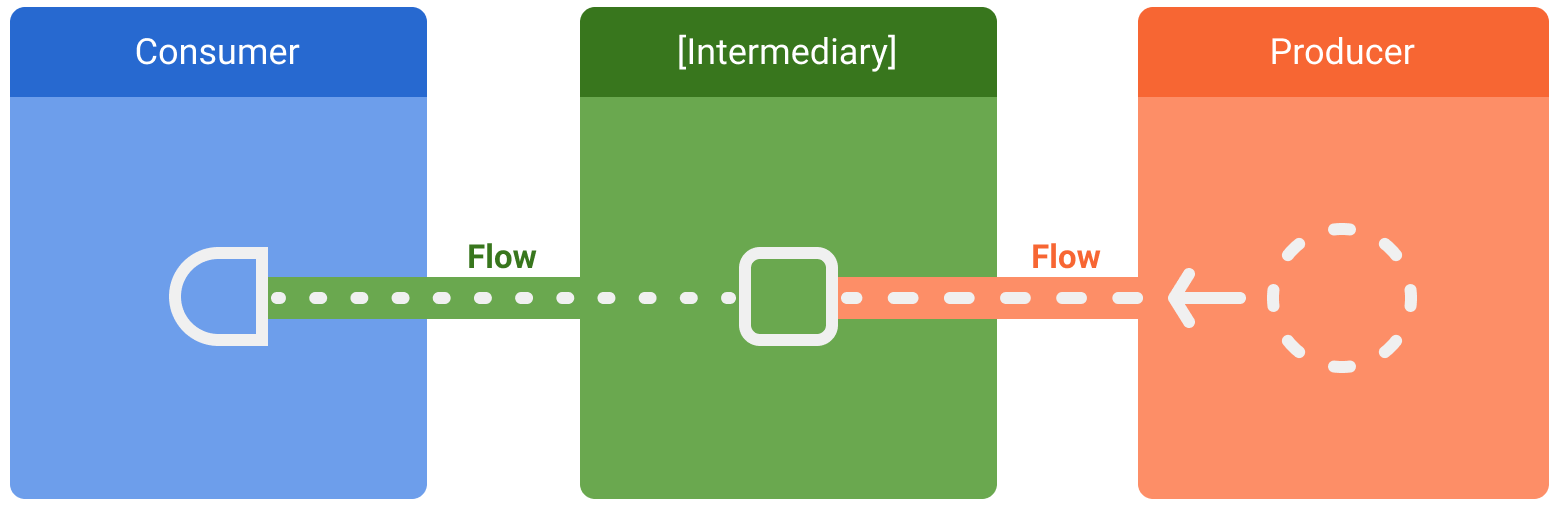
在 Android 中,*代码库* 通常是 UI 数据的生产者,而用户界面 (UI) 则是最终显示数据的消费者。在其他情况下,UI 层是用户输入事件的生产者,而层次结构的其他层则消费这些事件。生产者和消费者之间的层通常充当中间件,修改数据流以使其适应下一层的要求。
创建 Flow
要创建 Flow,请使用 Flow 构建器 API。flow 构建器函数会创建一个新的 Flow,你可以在其中使用 emit 函数手动将新值发出到数据流中。
在以下示例中,数据源会以固定间隔自动获取最新新闻。由于挂起函数无法返回多个连续值,因此数据源会创建并返回一个 Flow 来满足此要求。在本例中,数据源充当生产者。
class NewsRemoteDataSource(
    private val newsApi: NewsApi,
    private val refreshIntervalMs: Long = 5000
) {
    val latestNews: Flow<List<ArticleHeadline>> = flow {
        while(true) {
            val latestNews = newsApi.fetchLatestNews()
            emit(latestNews) // Emits the result of the request to the flow
            delay(refreshIntervalMs) // Suspends the coroutine for some time
        }
    }
}

// Interface that provides a way to make network requests with suspend functions
interface NewsApi {
    suspend fun fetchLatestNews(): List<ArticleHeadline>
}
flow 构建器在协程中执行。因此,它受益于相同的异步 API,但有一些限制:
- Flow 是*顺序的*。由于生产者位于协程中,因此在调用挂起函数时,生产者会暂停,直到挂起函数返回。在本例中,生产者会暂停,直到
fetchLatestNews网络请求完成。只有这样,结果才会发出到流中。 - 使用
flow构建器时,生产者无法从不同的CoroutineContext发出值。因此,不要通过创建新的协程或使用withContext代码块在不同的CoroutineContext中调用emit。在这些情况下,你可以使用其他 Flow 构建器,例如callbackFlow。
修改流
中介可以使用*中间运算符*修改数据流,而无需消费值。这些运算符是当应用于数据流时,会设置一系列操作的函数,这些操作在将来消费值之前不会执行。如需详细了解中间运算符,请参阅 Flow 参考文档。
在以下示例中,代码库层使用中间运算符 map 来转换要在 View 上显示的数据:
class NewsRepository(
    private val newsRemoteDataSource: NewsRemoteDataSource,
    private val userData: UserData
) {
    /**
     * Returns the favorite latest news applying transformations on the flow.
     * These operations are lazy and don't trigger the flow. They just transform
     * the current value emitted by the flow at that point in time.
     */
    val favoriteLatestNews: Flow<List<ArticleHeadline>> =
        newsRemoteDataSource.latestNews
            // Intermediate operation to filter the list of favorite topics
            .map { news -> news.filter { userData.isFavoriteTopic(it) } }
            // Intermediate operation to save the latest news in the cache
            .onEach { news -> saveInCache(news) }
}
中间运算符可以一个接一个地应用,形成一个操作链,当有项目发出到 Flow 中时,这些操作会惰性执行。请注意,简单地将中间运算符应用于流并不会开始 Flow 收集。
从 Flow 收集数据
使用*终端运算符*触发 Flow 开始监听值。要获取流中所有发出的值,请使用 collect。你可以在 官方 Flow 文档 中了解有关终端运算符的更多信息。
由于 collect 是一个挂起函数,它需要在协程中执行。它将一个 lambda 作为参数,该 lambda 在每个新值上被调用。由于它是一个挂起函数,调用 collect 的协程可能会暂停,直到 Flow 关闭。
继续前面的示例,下面是一个简单的 ViewModel 实现,用于从代码库层消费数据:
class LatestNewsViewModel(
    private val newsRepository: NewsRepository
) : ViewModel() {

    init {
        viewModelScope.launch {
            // Trigger the flow and consume its elements using collect
            newsRepository.favoriteLatestNews.collect { favoriteNews ->
                // Update View with the latest favorite news
            }
        }
    }
}
收集 Flow 会触发生产者刷新最新新闻并以固定间隔发出网络请求的结果。由于生产者通过 while(true) 循环始终保持活跃,因此当 ViewModel 被清除且 viewModelScope 被取消时,数据流将关闭。
Flow 收集可能因以下原因停止:
- 收集的协程被取消,如前面的示例所示。这也会停止底层生产者。
- 生产者完成发出项目。在这种情况下,数据流关闭,调用
collect的协程恢复执行。
除非使用其他中间运算符指定,否则 Flow 是*冷的*和*惰性的*。这意味着每次在 Flow 上调用终端运算符时,都会执行生产者代码。在前面的示例中,拥有多个 Flow 收集器会导致数据源在不同的固定间隔内多次获取最新新闻。为了在多个消费者同时收集时优化和共享 Flow,请使用 shareIn 运算符。
捕获意外异常
生产者的实现可能来自第三方库。这意味着它可能会抛出意外异常。要处理这些异常,请使用 catch 中间运算符。
class LatestNewsViewModel(
    private val newsRepository: NewsRepository
) : ViewModel() {

    init {
        viewModelScope.launch {
            newsRepository.favoriteLatestNews
                // Intermediate catch operator. If an exception is thrown,
                // catch and update the UI
                .catch { exception -> notifyError(exception) }
                .collect { favoriteNews ->
                    // Update View with the latest favorite news
                }
        }
    }
}
在前面的示例中,当发生异常时,collect lambda 不会被调用,因为尚未收到新项目。
catch 也可以向 Flow emit 项目。示例代码库层可以改为 emit 缓存的值:
class NewsRepository(...) {
    val favoriteLatestNews: Flow<List<ArticleHeadline>> =
        newsRemoteDataSource.latestNews
            .map { news -> news.filter { userData.isFavoriteTopic(it) } }
            .onEach { news -> saveInCache(news) }
            // If an error happens, emit the last cached values
            .catch { exception -> emit(lastCachedNews()) }
}
在此示例中,当发生异常时,collect lambda 被调用,因为由于异常已有一个新项目发出到流中。
在不同的 CoroutineContext 中执行
默认情况下,flow 构建器的生产者在从其收集的协程的 CoroutineContext 中执行,并且如前所述,它无法从不同的 CoroutineContext 发出值。在某些情况下,此行为可能不尽如人意。例如,在本主题中使用的示例中,代码库层不应在 Dispatchers.Main(由 viewModelScope 使用)上执行操作。
要更改 Flow 的 CoroutineContext,请使用中间运算符 flowOn。flowOn 会更改*上游 Flow* 的 CoroutineContext,这意味着生产者和任何在 flowOn *之前(或之上)*应用的中间运算符。*下游 Flow*(flowOn *之后*的中间运算符以及消费者)不受影响,并在用于从 Flow collect 的 CoroutineContext 上执行。如果存在多个 flowOn 运算符,则每个运算符都会从其当前位置更改上游。
class NewsRepository(
    private val newsRemoteDataSource: NewsRemoteDataSource,
    private val userData: UserData,
    private val defaultDispatcher: CoroutineDispatcher
) {
    val favoriteLatestNews: Flow<List<ArticleHeadline>> =
        newsRemoteDataSource.latestNews
            .map { news -> // Executes on the default dispatcher
                news.filter { userData.isFavoriteTopic(it) }
            }
            .onEach { news -> // Executes on the default dispatcher
                saveInCache(news)
            }
            // flowOn affects the upstream flow ↑
            .flowOn(defaultDispatcher)
            // the downstream flow ↓ is not affected
            .catch { exception -> // Executes in the consumer's context
                emit(lastCachedNews())
            }
}
使用此代码,onEach 和 map 运算符使用 defaultDispatcher,而 catch 运算符和消费者在 viewModelScope 使用的 Dispatchers.Main 上执行。
由于数据源层正在执行 I/O 工作,因此应使用针对 I/O 操作优化的调度器:
class NewsRemoteDataSource(
    ...,
    private val ioDispatcher: CoroutineDispatcher
) {
    val latestNews: Flow<List<ArticleHeadline>> = flow {
        // Executes on the IO dispatcher
        ...
    }
        .flowOn(ioDispatcher)
}
Jetpack 库中的 Flow
Flow 已集成到许多 Jetpack 库中,并在 Android 第三方库中很受欢迎。Flow 非常适合实时数据更新和无尽的数据流。
你可以使用 Flow 和 Room 来接收数据库更改通知。使用 数据访问对象 (DAO) 时,返回 Flow 类型以获取实时更新。
@Dao
abstract class ExampleDao {
    @Query("SELECT * FROM Example")
    abstract fun getExamples(): Flow<List<Example>>
}
每次 Example 表中发生更改时,都会发出一个新列表,其中包含数据库中的新项目。
将基于回调的 API 转换为 Flow
callbackFlow 是一个 Flow 构建器,可让你将基于回调的 API 转换为 Flow。例如,Firebase Firestore Android API 使用回调。
要将这些 API 转换为 Flow 并监听 Firestore 数据库更新,可以使用以下代码:
class FirestoreUserEventsDataSource(
    private val firestore: FirebaseFirestore
) {
    // Method to get user events from the Firestore database
    fun getUserEvents(): Flow<UserEvents> = callbackFlow {

        // Reference to use in Firestore
        var eventsCollection: CollectionReference? = null
        try {
            eventsCollection = FirebaseFirestore.getInstance()
                .collection("collection")
                .document("app")
        } catch (e: Throwable) {
            // If Firebase cannot be initialized, close the stream of data
            // flow consumers will stop collecting and the coroutine will resume
            close(e)
        }

        // Registers callback to firestore, which will be called on new events
        val subscription = eventsCollection?.addSnapshotListener { snapshot, _ ->
            if (snapshot == null) { return@addSnapshotListener }
            // Sends events to the flow! Consumers will get the new events
            try {
                trySend(snapshot.getEvents())
            } catch (e: Throwable) {
                // Event couldn't be sent to the flow
            }
        }

        // The callback inside awaitClose will be executed when the flow is
        // either closed or cancelled.
        // In this case, remove the callback from Firestore
        awaitClose { subscription?.remove() }
    }
}
与 flow 构建器不同,callbackFlow 允许使用 send 函数从不同的 CoroutineContext 发出值,或者使用 trySend 函数在协程外部发出值。
在内部,callbackFlow 使用 channel,它在概念上与阻塞 队列 非常相似。一个 channel 配置了*容量*,即可以缓冲的最大元素数量。callbackFlow 中创建的 channel 默认容量为 64 个元素。当你尝试向一个已满的 channel 添加新元素时,send 会挂起生产者,直到有空间容纳新元素,而 trySend 不会将元素添加到 channel 中,并立即返回 false。
trySend 会立即将指定元素添加到 channel 中,但前提是这不违反其容量限制,然后返回成功结果。